

Is It Mandatory to Submit an XML Sitemap to Google Search Console?
No, submitting an XML sitemap to Google Search Console is not mandatory. Google can find and index your pages just by crawling links from other sites or from your own internal linking, with no sitemap involved at all. That said, “not mandatory” doesn’t mean “not worth doing.” For most sites, submitting a sitemap is one of the easiest, lowest-effort things you can do to help Google crawl your content faster and more completely, and skipping it usually costs you more than it saves.
Let’s break down when a sitemap actually matters, when it barely matters, and how to submit one properly without overthinking it.
What an XML Sitemap Actually Does

An XML sitemap is just a file listing the URLs on your site that you want search engines to know about. It doesn’t force Google to rank those pages, and it doesn’t guarantee indexing. What it does is act as a direct signal, telling Google “here is a full list of my pages, please consider crawling them,” rather than relying entirely on Google stumbling onto them through links.
Think of it less as a requirement and more as a map you’re handing to someone who could technically find their way without it, but will get there faster and more reliably if you just give it to them.
When a Sitemap Matters the Most
A sitemap becomes genuinely important in a few specific situations:
New websites with few or no external backlinks. If nothing else on the internet is linking to your site yet, Google has no strong path leading it to your pages naturally. A sitemap gives Google a direct route in, which matters a lot when your site has zero authority built up yet.
Large sites with thousands of pages. E-commerce stores, particularly ones running WooCommerce with a large product catalog, fall squarely into this category. When you have thousands of product pages, many of them several clicks deep from the homepage, a sitemap makes sure none of them get missed simply because they weren’t well linked internally.
Sites with pages that are isolated or poorly linked internally. If some of your pages aren’t reachable through normal site navigation, whether because of how categories are structured or because older content fell out of your main menu, a sitemap is often the only way Google finds them at all.
Sites using dynamic content or JavaScript-heavy pages. If your site generates content in a way that’s harder for Googlebot to follow through standard link crawling, a sitemap gives Google a cleaner, more reliable list to work from.
If your site is small, well linked internally, and already has decent external links pointing to it, a sitemap matters far less. Google will likely find your pages either way.
Why You Should Still Submit One Even Though It’s Optional

Beyond just helping Google discover new pages, a submitted sitemap gives you something extra: visibility. Once it’s submitted in Search Console, you can see exactly how many of your submitted URLs are actually indexed, and Google will flag specific problems, like server errors, redirect issues, or pages it has decided not to index and why. Without a submitted sitemap, diagnosing these issues on a large site becomes far more difficult, since you’re left guessing which pages Google has seen and which it hasn’t.
It also helps you catch problems early. If you publish 50 new product pages and your sitemap shows only 30 of them indexed weeks later, that’s a clear signal something is wrong, whether it’s a noindex tag left on by mistake, a crawl budget issue, or a technical error blocking those pages. Without the sitemap data, you might not notice this gap for months.
How to Submit an XML Sitemap to Google Search Console
The process itself takes a few minutes:
- Sign in to Google Search Console and select your verified property.
- In the left-hand menu, click Sitemaps.
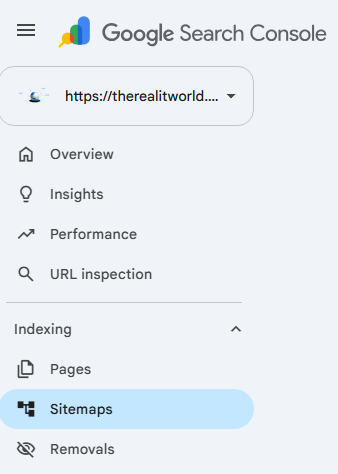
- In the field provided, type the path to your sitemap file, usually just
sitemap.xmlorsitemap_index.xmladded after your domain. - Click Submit.

Google will confirm whether the sitemap was read successfully, and over the following days you’ll start to see indexing status for the URLs inside it. This isn’t instant. It can take anywhere from a few days to a few weeks for Google to fully crawl through everything listed, especially on a larger site.
If you’re running WordPress with an SEO plugin like Yoast, your sitemap is generated automatically and usually lives at a predictable URL like yourdomain.com/sitemap_index.xml. You don’t need to build one manually in that case, just confirm the URL and submit it.
Handling Very Large Sitemaps

A single XML sitemap file has a hard limit of 50,000 URLs. If your site has more pages than that, which is common for large e-commerce stores or content-heavy sites, you’ll need a sitemap index file that links out to multiple smaller sitemap files, each staying under that limit.
Most SEO plugins and e-commerce platforms handle this splitting automatically once your page count grows past the threshold, so this usually isn’t something you need to build by hand. What does matter is making sure this process is automated rather than manually maintained, since a site with thousands of pages that relies on someone remembering to update a sitemap file by hand will fall out of date quickly.
Do You Need to Resubmit It Every Time You Update Your Site?
No, and this is a common source of unnecessary busywork. Once your sitemap is submitted and it’s set up to regenerate automatically (which it will be if you’re using a proper SEO plugin or e-commerce platform), Google will notice changes on its own during its regular recrawl cycle. You don’t need to log in and resubmit every time you publish a new page or update an old one.
The one exception is if you want a specific new page indexed faster than Google’s normal crawl schedule would get to it. In that case, using the URL Inspection tool in Search Console to request indexing for that individual page is a faster route than waiting on the sitemap’s next crawl.
Does Having a Sitemap Directly Improve Rankings?
No. A sitemap affects crawling and indexing, not ranking. It helps Google find and understand your pages more efficiently, but it has no direct influence on where those pages land in search results once they’re indexed. Rankings depend on content quality, relevance, backlinks, and dozens of other factors that a sitemap has nothing to do with.
Where a sitemap indirectly helps is by making sure your best content actually gets indexed in the first place. A great page that never gets crawled can’t rank at all, so in that sense, a sitemap removes one potential obstacle standing between your content and its ranking potential.
Frequently Asked Questions
Is submitting an XML sitemap required for Google to index my site? No. Google can discover and index pages through crawling links alone. A sitemap is a helpful signal, not a requirement.
Does a sitemap help my site rank higher? Not directly. It helps Google find and index your pages efficiently, but ranking depends on content quality, relevance, and backlinks.
How long does it take Google to index a sitemap after submission? It varies, but expect anywhere from a few days to a few weeks, depending on your site’s size and how often Google typically crawls it.
Do I need to resubmit my sitemap every time I add a new page? No. As long as your sitemap updates automatically, Google will pick up changes during its regular recrawl of your site.
What happens if my site has more than 50,000 URLs? You’ll need a sitemap index file linking to multiple sitemap files, each staying under the 50,000 URL limit. Most CMS platforms and SEO plugins handle this automatically.
Quick Recap
- Submitting a sitemap to Google Search Console is optional, not mandatory.
- It matters most for new sites, large sites, and sites with poorly linked pages.
- It gives you valuable indexing visibility in Search Console that’s hard to get otherwise.
- Submission takes a few minutes and doesn’t need to be repeated every time you update your site.
- A sitemap affects indexing and crawl efficiency, not rankings directly.
If you’re running a small, well-established site, skipping this step probably won’t hurt you much. If you’re running anything with real scale, a new domain, or a large product catalog, submitting your sitemap is a five-minute task that removes a lot of guesswork later on.